> ## Documentation Index
> Fetch the complete documentation index at: https://wb-21fd5541-docs-sandboxes-integrations-placement.mintlify.site/llms.txt
> Use this file to discover all available pages before exploring further.
# Evaluate models with W&B Weave and W&B Tables
> Learn how to evaluate machine learning models using W&B Weave and Tables.
## Evaluate models with Weave
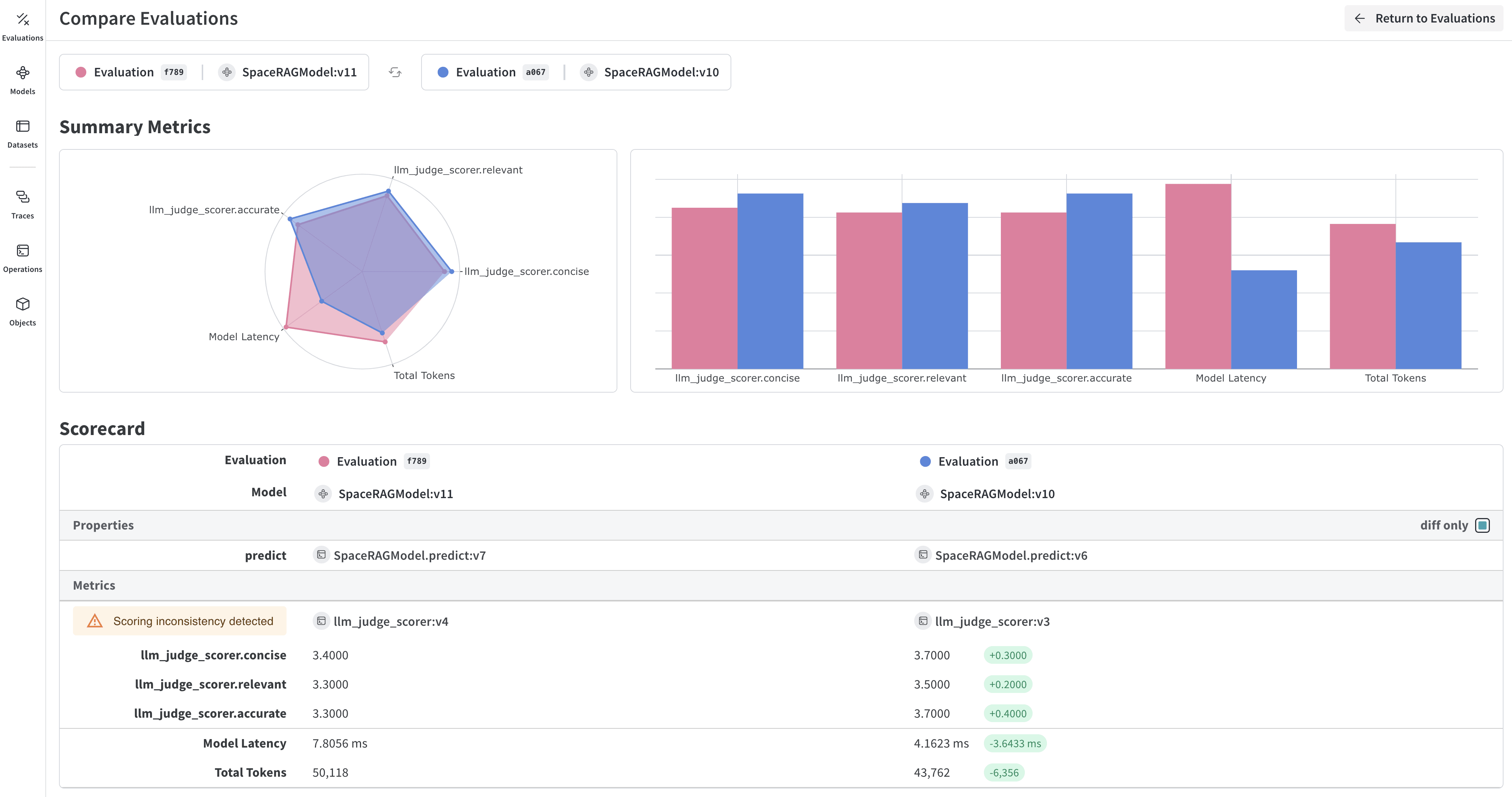
[W\&B Weave](/weave) is a purpose-built toolkit for evaluating LLMs and GenAI applications. It provides comprehensive evaluation capabilities including scorers, judges, and detailed tracing to help you understand and improve model performance. Weave integrates with W\&B Models, allowing you to evaluate models stored in your Model Registry.
 ### Key features for model evaluation
* **Scorers and judges**: Pre-built and custom evaluation metrics for accuracy, relevance, coherence, and more
* **Evaluation datasets**: Structured test sets with ground truth for systematic evaluation
* **Model versioning**: Track and compare different versions of your models
* **Detailed tracing**: Debug model behavior with complete input/output traces
* **Cost tracking**: Monitor API costs and token usage across evaluations
### Getting started: Evaluate a model from W\&B Registry
Download a model from W\&B Models Registry and evaluate it using Weave:
```python theme={null}
import weave
import wandb
from typing import Any
# Initialize Weave
weave.init("your-entity/your-project")
# Define a ChatModel that loads from W&B Registry
class ChatModel(weave.Model):
model_name: str
def model_post_init(self, __context):
# Download model from W&B Models Registry
with wandb.init(project="your-project", job_type="model_download") as run:
artifact = run.use_artifact(self.model_name)
self.model_path = artifact.download()
# Initialize your model here
@weave.op()
async def predict(self, query: str) -> str:
# Your model inference logic
return self.model.generate(query)
# Create evaluation dataset
dataset = weave.Dataset(name="eval_dataset", rows=[
{"input": "What is the capital of France?", "expected": "Paris"},
{"input": "What is 2+2?", "expected": "4"},
])
# Define scorers
@weave.op()
def exact_match_scorer(expected: str, output: str) -> dict:
return {"correct": expected.lower() == output.lower()}
# Run evaluation
model = ChatModel(model_name="wandb-entity/registry-name/model:version")
evaluation = weave.Evaluation(
dataset=dataset,
scorers=[exact_match_scorer]
)
results = await evaluation.evaluate(model)
```
### Integrate Weave evaluations with W\&B Models
The [Models and Weave Integration Demo](/weave/cookbooks/Models_and_Weave_Integration_Demo) shows the complete workflow for:
1. **Load models from Registry**: Download fine-tuned models stored in W\&B Models Registry
2. **Create evaluation pipelines**: Build comprehensive evaluations with custom scorers
3. **Log results back to W\&B**: Connect evaluation metrics to your model runs
4. **Version evaluated models**: Save improved models back to the Registry
Log evaluation results to both Weave and W\&B Models:
```python theme={null}
# Run evaluation with W&B tracking
with weave.attributes({"wandb-run-id": wandb.run.id}):
summary, call = await evaluation.evaluate.call(evaluation, model)
# Log metrics to W&B Models
wandb.run.log(summary)
wandb.run.config.update({
"weave_eval_url": f"https://wandb.ai/{entity}/{project}/r/call/{call.id}"
})
```
### Advanced Weave features
#### Custom scorers and judges
Create sophisticated evaluation metrics tailored to your use case:
```python theme={null}
@weave.op()
def llm_judge_scorer(expected: str, output: str, judge_model) -> dict:
prompt = f"Is this answer correct? Expected: {expected}, Got: {output}"
judgment = await judge_model.predict(prompt)
return {"judge_score": judgment}
```
#### Batch evaluations
Evaluate multiple model versions or configurations:
```python theme={null}
models = [
ChatModel(model_name="model:v1"),
ChatModel(model_name="model:v2"),
]
for model in models:
results = await evaluation.evaluate(model)
print(f"{model.model_name}: {results}")
```
### Next steps
* [Complete Weave evaluation tutorial](/weave/tutorial-eval/)
* [Models and Weave integration example](/weave/cookbooks/Models_and_Weave_Integration_Demo)
## Evaluate models with tables
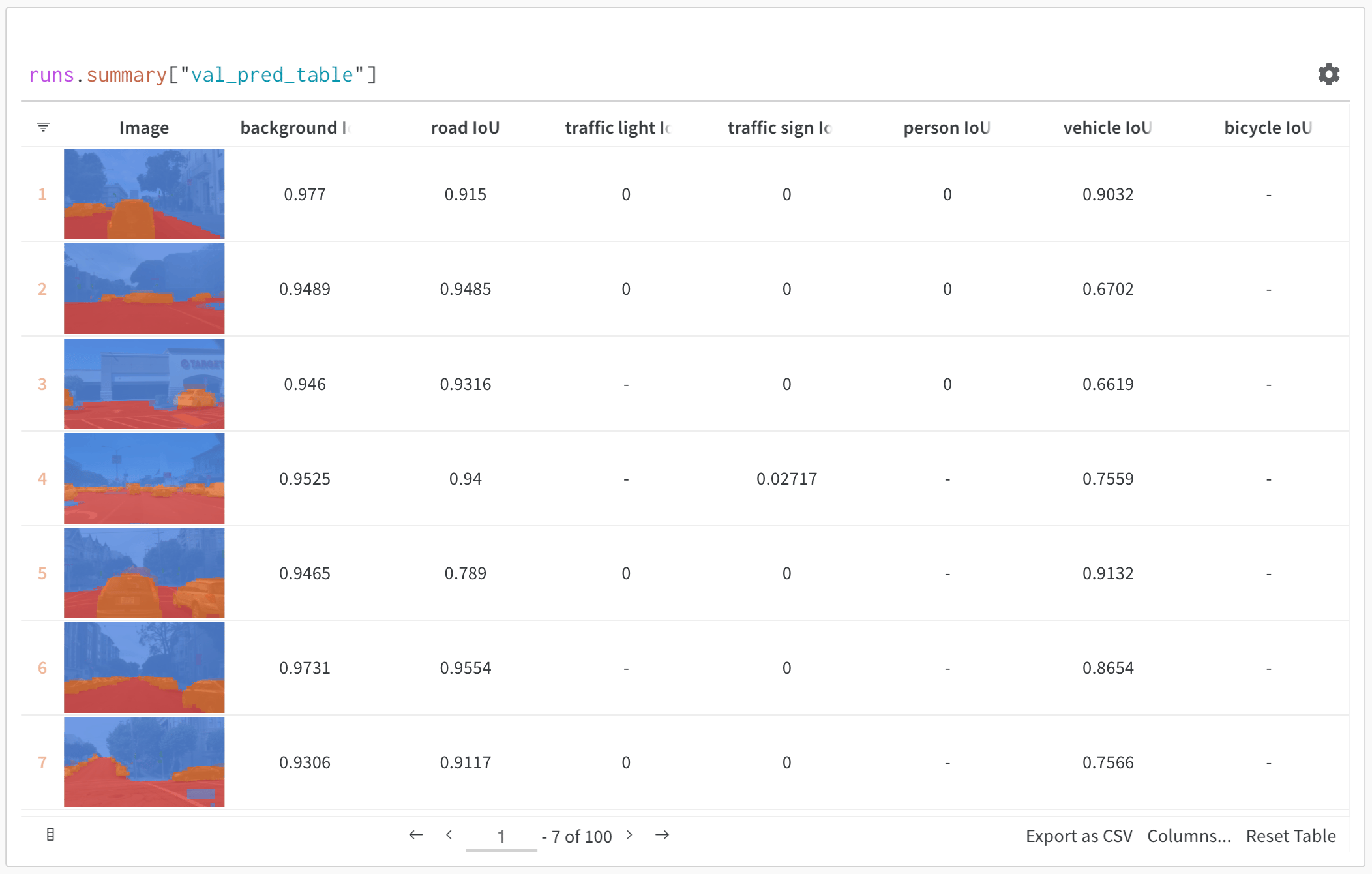
Use W\&B Tables to:
* **Compare model predictions**: View side-by-side comparisons of how different models perform on the same test set
* **Track prediction changes**: Monitor how predictions evolve across training epochs or model versions
* **Analyze errors**: Filter and query to find commonly misclassified examples and error patterns
* **Visualize rich media**: Display images, audio, text, and other media types alongside predictions and metrics
### Key features for model evaluation
* **Scorers and judges**: Pre-built and custom evaluation metrics for accuracy, relevance, coherence, and more
* **Evaluation datasets**: Structured test sets with ground truth for systematic evaluation
* **Model versioning**: Track and compare different versions of your models
* **Detailed tracing**: Debug model behavior with complete input/output traces
* **Cost tracking**: Monitor API costs and token usage across evaluations
### Getting started: Evaluate a model from W\&B Registry
Download a model from W\&B Models Registry and evaluate it using Weave:
```python theme={null}
import weave
import wandb
from typing import Any
# Initialize Weave
weave.init("your-entity/your-project")
# Define a ChatModel that loads from W&B Registry
class ChatModel(weave.Model):
model_name: str
def model_post_init(self, __context):
# Download model from W&B Models Registry
with wandb.init(project="your-project", job_type="model_download") as run:
artifact = run.use_artifact(self.model_name)
self.model_path = artifact.download()
# Initialize your model here
@weave.op()
async def predict(self, query: str) -> str:
# Your model inference logic
return self.model.generate(query)
# Create evaluation dataset
dataset = weave.Dataset(name="eval_dataset", rows=[
{"input": "What is the capital of France?", "expected": "Paris"},
{"input": "What is 2+2?", "expected": "4"},
])
# Define scorers
@weave.op()
def exact_match_scorer(expected: str, output: str) -> dict:
return {"correct": expected.lower() == output.lower()}
# Run evaluation
model = ChatModel(model_name="wandb-entity/registry-name/model:version")
evaluation = weave.Evaluation(
dataset=dataset,
scorers=[exact_match_scorer]
)
results = await evaluation.evaluate(model)
```
### Integrate Weave evaluations with W\&B Models
The [Models and Weave Integration Demo](/weave/cookbooks/Models_and_Weave_Integration_Demo) shows the complete workflow for:
1. **Load models from Registry**: Download fine-tuned models stored in W\&B Models Registry
2. **Create evaluation pipelines**: Build comprehensive evaluations with custom scorers
3. **Log results back to W\&B**: Connect evaluation metrics to your model runs
4. **Version evaluated models**: Save improved models back to the Registry
Log evaluation results to both Weave and W\&B Models:
```python theme={null}
# Run evaluation with W&B tracking
with weave.attributes({"wandb-run-id": wandb.run.id}):
summary, call = await evaluation.evaluate.call(evaluation, model)
# Log metrics to W&B Models
wandb.run.log(summary)
wandb.run.config.update({
"weave_eval_url": f"https://wandb.ai/{entity}/{project}/r/call/{call.id}"
})
```
### Advanced Weave features
#### Custom scorers and judges
Create sophisticated evaluation metrics tailored to your use case:
```python theme={null}
@weave.op()
def llm_judge_scorer(expected: str, output: str, judge_model) -> dict:
prompt = f"Is this answer correct? Expected: {expected}, Got: {output}"
judgment = await judge_model.predict(prompt)
return {"judge_score": judgment}
```
#### Batch evaluations
Evaluate multiple model versions or configurations:
```python theme={null}
models = [
ChatModel(model_name="model:v1"),
ChatModel(model_name="model:v2"),
]
for model in models:
results = await evaluation.evaluate(model)
print(f"{model.model_name}: {results}")
```
### Next steps
* [Complete Weave evaluation tutorial](/weave/tutorial-eval/)
* [Models and Weave integration example](/weave/cookbooks/Models_and_Weave_Integration_Demo)
## Evaluate models with tables
Use W\&B Tables to:
* **Compare model predictions**: View side-by-side comparisons of how different models perform on the same test set
* **Track prediction changes**: Monitor how predictions evolve across training epochs or model versions
* **Analyze errors**: Filter and query to find commonly misclassified examples and error patterns
* **Visualize rich media**: Display images, audio, text, and other media types alongside predictions and metrics
 ### Basic example: Log evaluation results
```python theme={null}
import wandb
# Initialize a run
run = wandb.init(project="model-evaluation")
# Create a table with evaluation results
columns = ["id", "input", "ground_truth", "prediction", "confidence", "correct"]
eval_table = wandb.Table(columns=columns)
# Add evaluation data
for idx, (input_data, label) in enumerate(test_dataset):
prediction = model(input_data)
confidence = prediction.max()
predicted_class = prediction.argmax()
eval_table.add_data(
idx,
wandb.Image(input_data), # Log images or other media
label,
predicted_class,
confidence,
label == predicted_class
)
# Log the table
run.log({"evaluation_results": eval_table})
```
### Advanced table workflows
#### Compare multiple models
Log evaluation tables from different models to the same key for direct comparison:
```python theme={null}
# Model A evaluation
with wandb.init(project="model-comparison", name="model_a") as run:
eval_table_a = create_eval_table(model_a, test_data)
run.log({"test_predictions": eval_table_a})
# Model B evaluation
with wandb.init(project="model-comparison", name="model_b") as run:
eval_table_b = create_eval_table(model_b, test_data)
run.log({"test_predictions": eval_table_b})
```
### Basic example: Log evaluation results
```python theme={null}
import wandb
# Initialize a run
run = wandb.init(project="model-evaluation")
# Create a table with evaluation results
columns = ["id", "input", "ground_truth", "prediction", "confidence", "correct"]
eval_table = wandb.Table(columns=columns)
# Add evaluation data
for idx, (input_data, label) in enumerate(test_dataset):
prediction = model(input_data)
confidence = prediction.max()
predicted_class = prediction.argmax()
eval_table.add_data(
idx,
wandb.Image(input_data), # Log images or other media
label,
predicted_class,
confidence,
label == predicted_class
)
# Log the table
run.log({"evaluation_results": eval_table})
```
### Advanced table workflows
#### Compare multiple models
Log evaluation tables from different models to the same key for direct comparison:
```python theme={null}
# Model A evaluation
with wandb.init(project="model-comparison", name="model_a") as run:
eval_table_a = create_eval_table(model_a, test_data)
run.log({"test_predictions": eval_table_a})
# Model B evaluation
with wandb.init(project="model-comparison", name="model_b") as run:
eval_table_b = create_eval_table(model_b, test_data)
run.log({"test_predictions": eval_table_b})
```
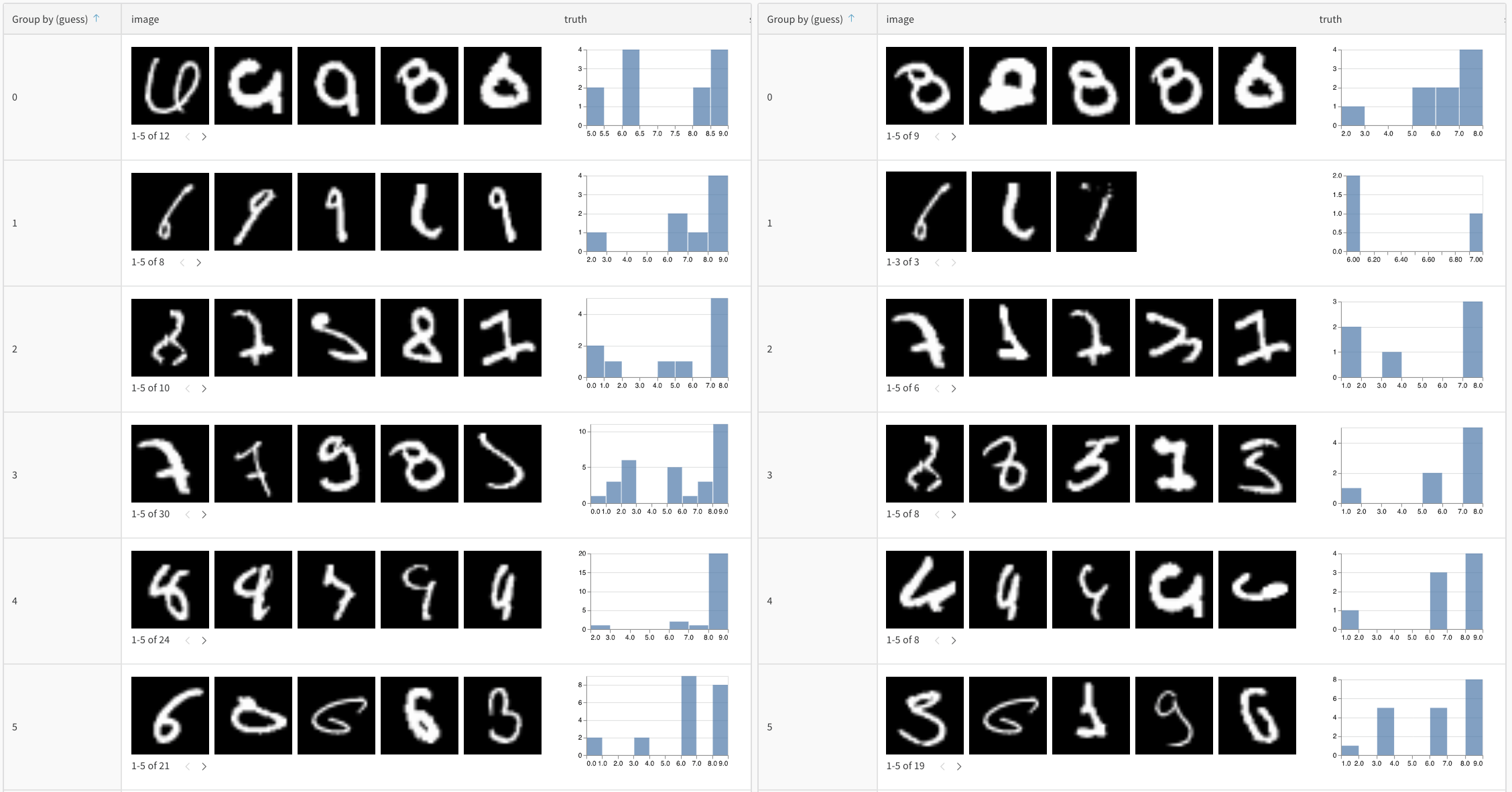 #### Track predictions over time
Log tables at different training epochs to visualize improvement:
```python theme={null}
for epoch in range(num_epochs):
train_model(model, train_data)
# Evaluate and log predictions for this epoch
eval_table = wandb.Table(columns=["image", "truth", "prediction"])
for image, label in test_subset:
pred = model(image)
eval_table.add_data(wandb.Image(image), label, pred.argmax())
wandb.log({f"predictions_epoch_{epoch}": eval_table})
```
### Interactive analysis in the W\&B UI
Once logged, you can:
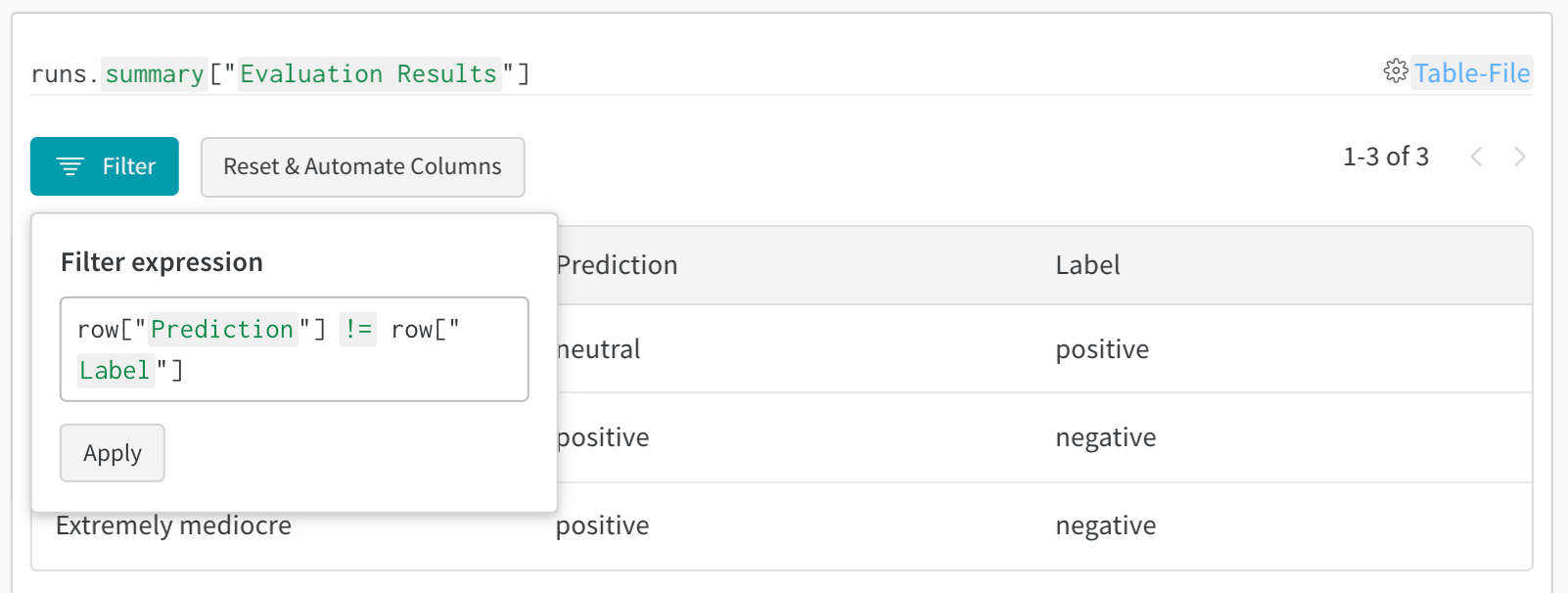
1. **Filter results**: Click on column headers to filter by prediction accuracy, confidence thresholds, or specific classes
2. **Compare tables**: Select multiple table versions to see side-by-side comparisons
3. **Query data**: Use the query bar to find specific patterns (for example, `"correct" = false AND "confidence" > 0.8`)
4. **Group and aggregate**: Group by predicted class to see per-class accuracy metrics
#### Track predictions over time
Log tables at different training epochs to visualize improvement:
```python theme={null}
for epoch in range(num_epochs):
train_model(model, train_data)
# Evaluate and log predictions for this epoch
eval_table = wandb.Table(columns=["image", "truth", "prediction"])
for image, label in test_subset:
pred = model(image)
eval_table.add_data(wandb.Image(image), label, pred.argmax())
wandb.log({f"predictions_epoch_{epoch}": eval_table})
```
### Interactive analysis in the W\&B UI
Once logged, you can:
1. **Filter results**: Click on column headers to filter by prediction accuracy, confidence thresholds, or specific classes
2. **Compare tables**: Select multiple table versions to see side-by-side comparisons
3. **Query data**: Use the query bar to find specific patterns (for example, `"correct" = false AND "confidence" > 0.8`)
4. **Group and aggregate**: Group by predicted class to see per-class accuracy metrics
 ### Example: Error analysis with enriched tables
```python theme={null}
# Create a mutable table to add analysis columns
eval_table = wandb.Table(
columns=["id", "image", "label", "prediction"],
log_mode="MUTABLE" # Allows adding columns later
)
# Initial predictions
for idx, (img, label) in enumerate(test_data):
pred = model(img)
eval_table.add_data(idx, wandb.Image(img), label, pred.argmax())
run.log({"eval_analysis": eval_table})
# Add confidence scores for error analysis
confidences = [model(img).max() for img, _ in test_data]
eval_table.add_column("confidence", confidences)
# Add error types
error_types = classify_errors(eval_table.get_column("label"),
eval_table.get_column("prediction"))
eval_table.add_column("error_type", error_types)
run.log({"eval_analysis": eval_table})
```
### Example: Error analysis with enriched tables
```python theme={null}
# Create a mutable table to add analysis columns
eval_table = wandb.Table(
columns=["id", "image", "label", "prediction"],
log_mode="MUTABLE" # Allows adding columns later
)
# Initial predictions
for idx, (img, label) in enumerate(test_data):
pred = model(img)
eval_table.add_data(idx, wandb.Image(img), label, pred.argmax())
run.log({"eval_analysis": eval_table})
# Add confidence scores for error analysis
confidences = [model(img).max() for img, _ in test_data]
eval_table.add_column("confidence", confidences)
# Add error types
error_types = classify_errors(eval_table.get_column("label"),
eval_table.get_column("prediction"))
eval_table.add_column("error_type", error_types)
run.log({"eval_analysis": eval_table})
```