> ## Documentation Index
> Fetch the complete documentation index at: https://wb-21fd5541-docs-sandboxes-integrations-placement.mintlify.site/llms.txt
> Use this file to discover all available pages before exploring further.
> Track and optimize DSPy programs with W&B to log prompts, evaluations, and compiled module performance.
# DSPy
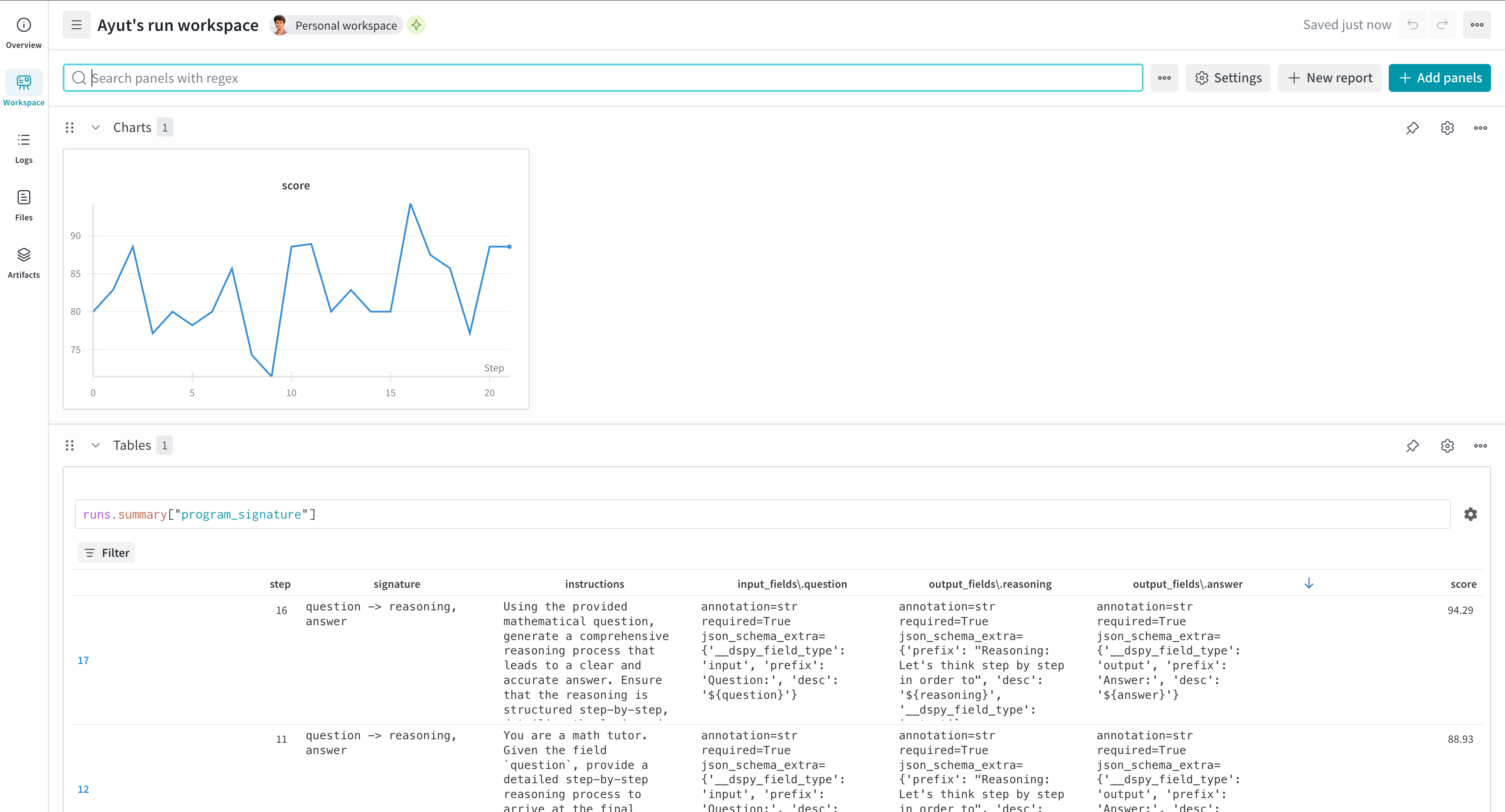
Use W\&B with DSPy to track and optimize your language model programs. W\&B complements the [Weave DSPy integration](/weave/guides/integrations/dspy) by providing:
* Evaluation metrics tracking over time
* W\&B Tables for program signature evolution
* Integration with DSPy optimizers like MIPROv2
For comprehensive observability when optimizing DSPy modules, enable the integration in both W\&B and Weave.
**Note**
As of `wandb==0.21.2` and `weave==0.52.5`, Weave initializes automatically when used with W\&B:
* If `weave` is imported and then `wandb.init()` is called (script case)
* If `wandb.init()` was called and then `weave` is imported later (notebook/Jupyter case)
No explicit `weave.init(...)` call is required.
## Install and authenticate
Install the required libraries and authenticate with W\&B:
1. Install the required libraries:
```shell theme={null}
pip install wandb weave dspy
```
2. Set the `WANDB_API_KEY` [environment variable](/models/track/environment-variables/) and log in:
```bash theme={null}
export WANDB_API_KEY=
wandb login
```
1. Install the required libraries:
```bash theme={null}
pip install wandb weave dspy
```
2. In your code, log in to W\&B:
```python theme={null}
import wandb
wandb.login()
```
Install and import the required libraries, then log in to W\&B:
```notebook theme={null}
!pip install wandb weave dspy
import wandb
wandb.login()
```
New to W\&B? See our [quickstart guide](/models/quickstart/).
## Track program optimization (experimental)
For DSPy optimizers that use `dspy.Evaluate` (such as MIPROv2), use the `WandbDSPyCallback` to log evaluation metrics over time and track program signature evolution in W\&B Tables.
```python theme={null}
import dspy
from dspy.datasets import MATH
import weave
import wandb
from wandb.integration.dspy import WandbDSPyCallback
# Initialize W&B (importing weave is sufficient; no explicit weave.init needed)
project_name = "dspy-optimization"
with wandb.init(project=project_name) as run:
# Add W&B callback to DSPy
dspy.settings.callbacks.append(
WandbDSPyCallback(run=run)
)
# Configure language models
teacher_lm = dspy.LM('openai/gpt-4o', max_tokens=2000, cache=True)
student_lm = dspy.LM('openai/gpt-4o-mini', max_tokens=2000)
dspy.configure(lm=student_lm)
# Load dataset and define program
dataset = MATH(subset='algebra')
program = dspy.ChainOfThought("question -> answer")
# Configure and run optimizer
optimizer = dspy.MIPROv2(
metric=dataset.metric,
auto="light",
num_threads=24,
teacher_settings=dict(lm=teacher_lm),
prompt_model=student_lm
)
optimized_program = optimizer.compile(
program,
trainset=dataset.train,
max_bootstrapped_demos=2,
max_labeled_demos=2
)
```
After running this code, you receive both a W\&B Run URL and a Weave URL. W\&B displays evaluation metrics over time, along with Tables that show the evolution of program signatures. The run's **Overview** tab includes links to Weave traces for detailed inspection.
If a `run` object is not passed to `WandbDSPyCallback`, the global `run` object is used.
 For comprehensive details about Weave tracing, evaluation, and optimization with DSPy, see the [Weave DSPy integration guide](/weave/guides/integrations/dspy).
## Log predictions to W\&B Tables
Enable detailed prediction logging to inspect individual examples during optimization. The callback creates a W\&B Tables for each evaluation step, which can help you to analyze specific successes and failures.
```python theme={null}
from wandb.integration.dspy import WandbDSPyCallback
# Enable prediction logging (enabled by default)
callback = WandbDSPyCallback(log_results=True)
dspy.settings.callbacks.append(callback)
# Run your optimization
optimized_program = optimizer.compile(program, trainset=train_data)
# Disable prediction logging if needed
# callback = WandbDSPyCallback(log_results=False)
```
### Access prediction data
After optimization, find your prediction data in W\&B:
1. Navigate to your run's **Overview** page.
2. Look for Table panels named with a pattern like `predictions_0`, `predictions_1`, and so forth.
3. Filter by `is_correct` to analyze failures.
4. Compare tables across runs in the project workspace.
Each table includes columns for:
* `example`: Input data
* `prediction`: Model output
* `is_correct`: Evaluation result
Learn more in the [W\&B Tables guide](/models/tables/visualize-tables/).
## Save and version DSPy programs
To reproduce and version your best DSpy programs, save them as W\&B Artifacts. Choose between saving the complete program or only the state.
```python theme={null}
from wandb.integration.dspy import WandbDSPyCallback
# Create callback instance
callback = WandbDSPyCallback()
dspy.settings.callbacks.append(callback)
# Run optimization
optimized_program = optimizer.compile(program, trainset=train_data)
# Save options:
# 1. Complete program (recommended) - includes architecture and state
callback.log_best_model(optimized_program, save_program=True)
# 2. State only as JSON - lighter weight, human-readable
callback.log_best_model(optimized_program, save_program=False, filetype="json")
# 3. State only as pickle - preserves Python objects
callback.log_best_model(optimized_program, save_program=False, filetype="pkl")
# Add custom aliases for versioning
callback.log_best_model(
optimized_program,
save_program=True,
aliases=["best", "production", "v2.0"]
)
```
For comprehensive details about Weave tracing, evaluation, and optimization with DSPy, see the [Weave DSPy integration guide](/weave/guides/integrations/dspy).
## Log predictions to W\&B Tables
Enable detailed prediction logging to inspect individual examples during optimization. The callback creates a W\&B Tables for each evaluation step, which can help you to analyze specific successes and failures.
```python theme={null}
from wandb.integration.dspy import WandbDSPyCallback
# Enable prediction logging (enabled by default)
callback = WandbDSPyCallback(log_results=True)
dspy.settings.callbacks.append(callback)
# Run your optimization
optimized_program = optimizer.compile(program, trainset=train_data)
# Disable prediction logging if needed
# callback = WandbDSPyCallback(log_results=False)
```
### Access prediction data
After optimization, find your prediction data in W\&B:
1. Navigate to your run's **Overview** page.
2. Look for Table panels named with a pattern like `predictions_0`, `predictions_1`, and so forth.
3. Filter by `is_correct` to analyze failures.
4. Compare tables across runs in the project workspace.
Each table includes columns for:
* `example`: Input data
* `prediction`: Model output
* `is_correct`: Evaluation result
Learn more in the [W\&B Tables guide](/models/tables/visualize-tables/).
## Save and version DSPy programs
To reproduce and version your best DSpy programs, save them as W\&B Artifacts. Choose between saving the complete program or only the state.
```python theme={null}
from wandb.integration.dspy import WandbDSPyCallback
# Create callback instance
callback = WandbDSPyCallback()
dspy.settings.callbacks.append(callback)
# Run optimization
optimized_program = optimizer.compile(program, trainset=train_data)
# Save options:
# 1. Complete program (recommended) - includes architecture and state
callback.log_best_model(optimized_program, save_program=True)
# 2. State only as JSON - lighter weight, human-readable
callback.log_best_model(optimized_program, save_program=False, filetype="json")
# 3. State only as pickle - preserves Python objects
callback.log_best_model(optimized_program, save_program=False, filetype="pkl")
# Add custom aliases for versioning
callback.log_best_model(
optimized_program,
save_program=True,
aliases=["best", "production", "v2.0"]
)
```