> ## Documentation Index
> Fetch the complete documentation index at: https://wb-21fd5541-docs-sandboxes-integrations-placement.mintlify.site/llms.txt
> Use this file to discover all available pages before exploring further.

> 자동화된 테스트와 실험 추적을 사용해 ML 모델과 데이터셋을 검증할 수 있도록 W&B를 Deepchecks와 통합하세요.

# DeepChecks

export const ColabLink = ({url}) => <a href={url} target="_blank" rel="noopener noreferrer" className="colab-link">
    <svg width="20" height="20" viewBox="0 0 24 24" fill="currentColor" xmlns="http://www.w3.org/2000/svg">
      <path d="M14.25.18l.9.2.73.26.59.3.45.32.34.34.25.34.16.33.1.3.04.26.02.2-.01.13V8.5l-.05.63-.13.55-.21.46-.26.38-.3.31-.33.25-.35.19-.35.14-.33.1-.3.07-.26.04-.21.02H8.77l-.69.05-.59.14-.5.22-.41.27-.33.32-.27.35-.2.36-.15.37-.1.35-.07.32-.04.27-.02.21v3.06H3.17l-.21-.03-.28-.07-.32-.12-.35-.18-.36-.26-.36-.36-.35-.46-.32-.59-.28-.73-.21-.88-.14-1.05-.05-1.23.06-1.22.16-1.04.24-.87.32-.71.36-.57.4-.44.42-.33.42-.24.4-.16.36-.1.32-.05.24-.01h.16l.06.01h8.16v-.83H6.18l-.01-2.75-.02-.37.05-.34.11-.31.17-.28.25-.26.31-.23.38-.2.44-.18.51-.15.58-.12.64-.1.71-.06.77-.04.84-.02 1.27.05zm-6.3 1.98l-.23.33-.08.41.08.41.23.34.33.22.41.09.41-.09.33-.22.23-.34.08-.41-.08-.41-.23-.33-.33-.22-.41-.09-.41.09zm13.09 3.95l.28.06.32.12.35.18.36.27.36.35.35.47.32.59.28.73.21.88.14 1.04.05 1.23-.06 1.23-.16 1.04-.24.86-.32.71-.36.57-.4.45-.42.33-.42.24-.4.16-.36.09-.32.05-.24.02-.16-.01h-8.22v.82h5.84l.01 2.76.02.36-.05.34-.11.31-.17.29-.25.25-.31.24-.38.2-.44.17-.51.15-.58.13-.64.09-.71.07-.77.04-.84.01-1.27-.04-1.07-.14-.9-.2-.73-.25-.59-.3-.45-.33-.34-.34-.25-.34-.16-.33-.1-.3-.04-.25-.02-.2.01-.13v-5.34l.05-.64.13-.54.21-.46.26-.38.3-.32.33-.24.35-.2.35-.14.33-.1.3-.06.26-.04.21-.02.13-.01h5.84l.69-.05.59-.14.5-.21.41-.28.33-.32.27-.35.2-.36.15-.36.1-.35.07-.32.04-.28.02-.21V6.07h2.09l.14.01.21.03zm-6.47 14.25l-.23.33-.08.41.08.41.23.33.33.23.41.08.41-.08.33-.23.23-.33.08-.41-.08-.41-.23-.33-.33-.23-.41-.08-.41.08z" />
    </svg>
    Colab에서 사용해 보기
  </a>;

<ColabLink url="https://colab.research.google.com/github/deepchecks/deepchecks/blob/0.5.0-1-g5380093/docs/source/examples/guides/export_outputs_to_wandb.ipynb" />

DeepChecks를 사용하면 적은 노력으로도 머신 러닝 모델과 데이터를 검증할 수 있습니다. 예를 들어 데이터 무결성을 확인하고, 데이터 분포를 점검하고, 데이터 분할을 검증하고, 모델을 평가하고, 서로 다른 모델을 비교할 수 있습니다.

[DeepChecks와 wandb 인테그레이션에 대해 자세히 알아보기 ->](https://docs.deepchecks.com/stable/general/usage/exporting_results/auto_examples/plot_exports_output_to_wandb.html)

<div id="getting-started">
  ## 시작하기
</div>

DeepChecks에서 W\&B를 사용하려면 먼저 [W\&B 계정](https://wandb.ai/site)에 가입해야 합니다. DeepChecks의 W\&B 인테그레이션을 사용하면 다음과 같이 바로 시작할 수 있습니다:

```python theme={null}
import wandb

wandb.login()

# deepchecks에서 check 임포트
from deepchecks.checks import ModelErrorAnalysis

# check 실행
result = ModelErrorAnalysis()

# 결과를 wandb에 푸시
result.to_wandb()
```

DeepChecks 테스트 스위트 전체를 W\&B에 로깅할 수도 있습니다.

```python theme={null}
import wandb

wandb.login()

# deepchecks에서 full_suite 테스트 임포트
from deepchecks.suites import full_suite

# DeepChecks 테스트 스위트 생성 및 실행
suite_result = full_suite().run(...)

# 결과를 wandb에 푸시
# 필요한 wandb.init 설정 및 인수를 여기서 전달할 수 있습니다
suite_result.to_wandb(project="my-suite-project", config={"suite-name": "full-suite"})
```

<div id="example">
  ## 예시
</div>

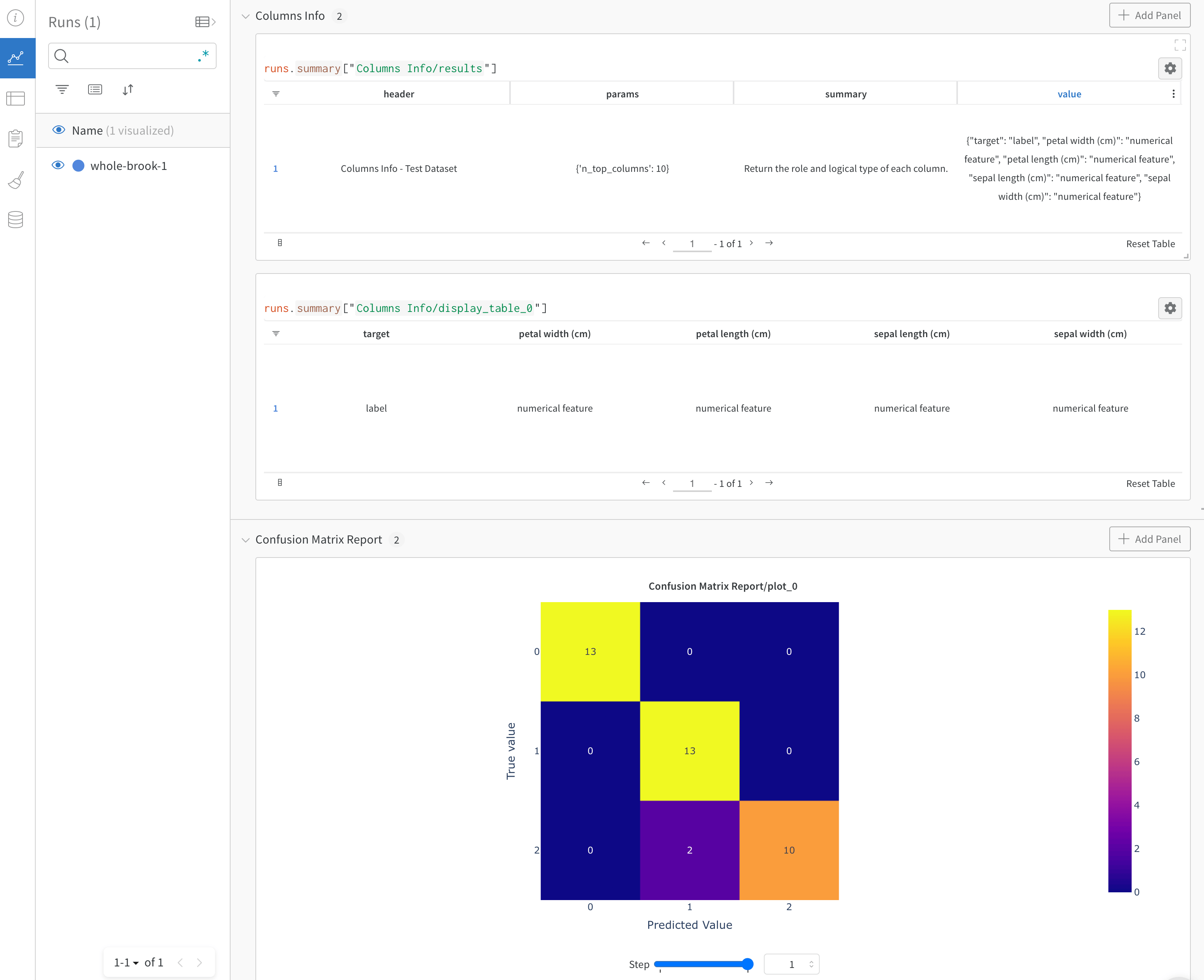
[이 리포트](https://wandb.ai/cayush/deepchecks/reports/Validate-your-Data-and-Models-with-Deepchecks-and-W-B--VmlldzoxNjY0ODc5)는 DeepChecks와 W\&B를 함께 사용할 때의 강력한 활용 효과를 보여줍니다.

<Frame>
  <img src="https://mintcdn.com/wb-21fd5541-docs-sandboxes-integrations-placement/F9fRIboixVPY5pzA/images/integrations/deepchecks_example.png?fit=max&auto=format&n=F9fRIboixVPY5pzA&q=85&s=d7d0c70f53cd2fb8be3031439018e08c" alt="Deepchecks 데이터 검증 결과" width="3102" height="2526" data-path="images/integrations/deepchecks_example.png" />
</Frame>

이 W\&B 인테그레이션에 대해 궁금한 점이 있거나 문제가 발생했나요? [DeepChecks GitHub 저장소](https://github.com/deepchecks/deepchecks)에 이슈를 등록해 주시면, 저희가 확인해 답변드리겠습니다.