> ## Documentation Index
> Fetch the complete documentation index at: https://wb-21fd5541-docs-sandboxes-integrations-placement.mintlify.site/llms.txt
> Use this file to discover all available pages before exploring further.
# Hugging Face Diffusers
> Hugging Face Diffusers と W&B autolog を使用して、プロンプト、生成されたメディア、設定、パイプラインアーキテクチャをトラッキングします。
export const ColabLink = ({url}) =>
Colabで試す
;
## たった2行で高度なロギング
たった2行のコードを追加するだけで、実験に関連するすべてのプロンプト、ネガティブプロンプト、生成されたメディア、設定をログできます。ロギングを開始するための2行のコードを以下に示します。
```python theme={null}
# autolog関数をimportする
from wandb.integration.diffusers import autolog
# パイプラインを呼び出す前にautologを呼び出す
autolog(init=dict(project="diffusers_logging"))
```
## Get started
1. `diffusers`、`transformers`、`accelerate`、`wandb` をインストールします。
* コマンドライン:
```shell theme={null}
pip install --upgrade diffusers transformers accelerate wandb
```
* ノートブック:
```bash theme={null}
!pip install --upgrade diffusers transformers accelerate wandb
```
2. `autolog` を使用して W\&B Run を初期化し、[サポートされているすべてのパイプライン呼び出し](https://github.com/wandb/wandb/blob/main/wandb/integration/diffusers/autologger.py#L12-L72)の入力と出力を自動的にトラッキングします。
`autolog()` 関数は `init` パラメーター付きで呼び出すことができ、このパラメーターには [`wandb.init()`](/ja/models/ref/python/functions/init) に必要なパラメーターを含む辞書を指定します。
`autolog()` を呼び出すと、W\&B Run が初期化され、[サポートされているすべてのパイプライン呼び出し](https://github.com/wandb/wandb/blob/main/wandb/integration/diffusers/autologger.py#L12-L72)の入力と出力が自動的にトラッキングされます。
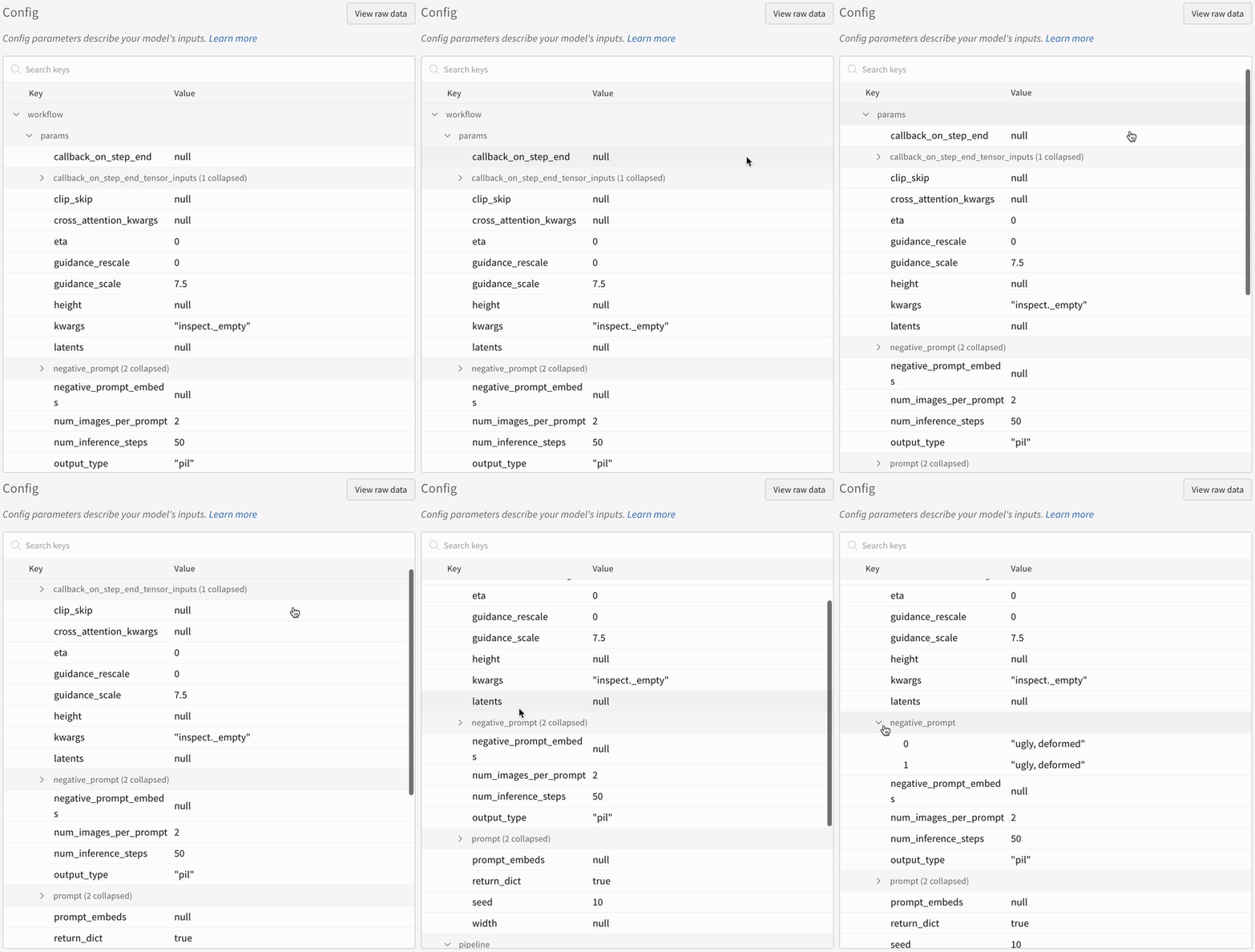
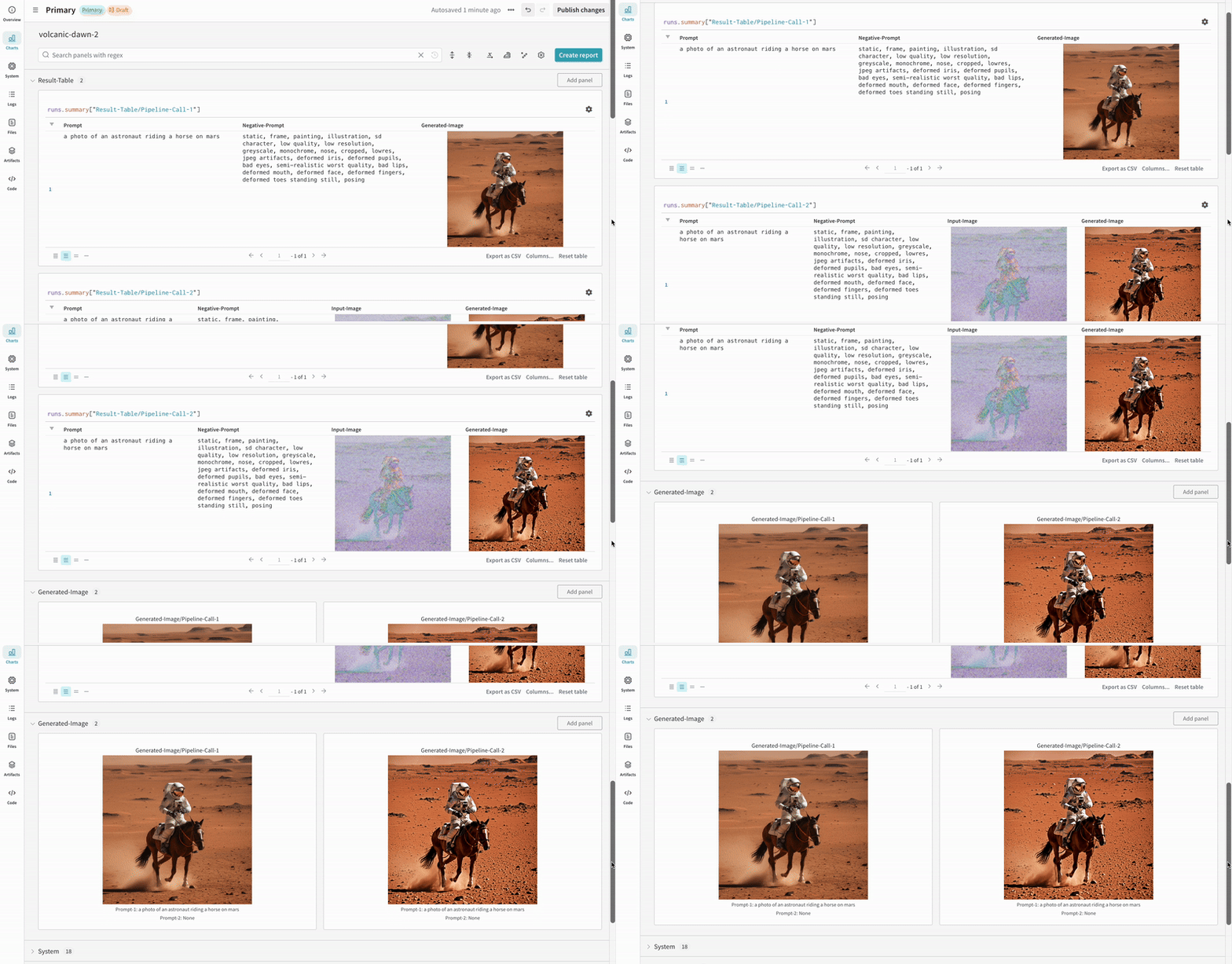
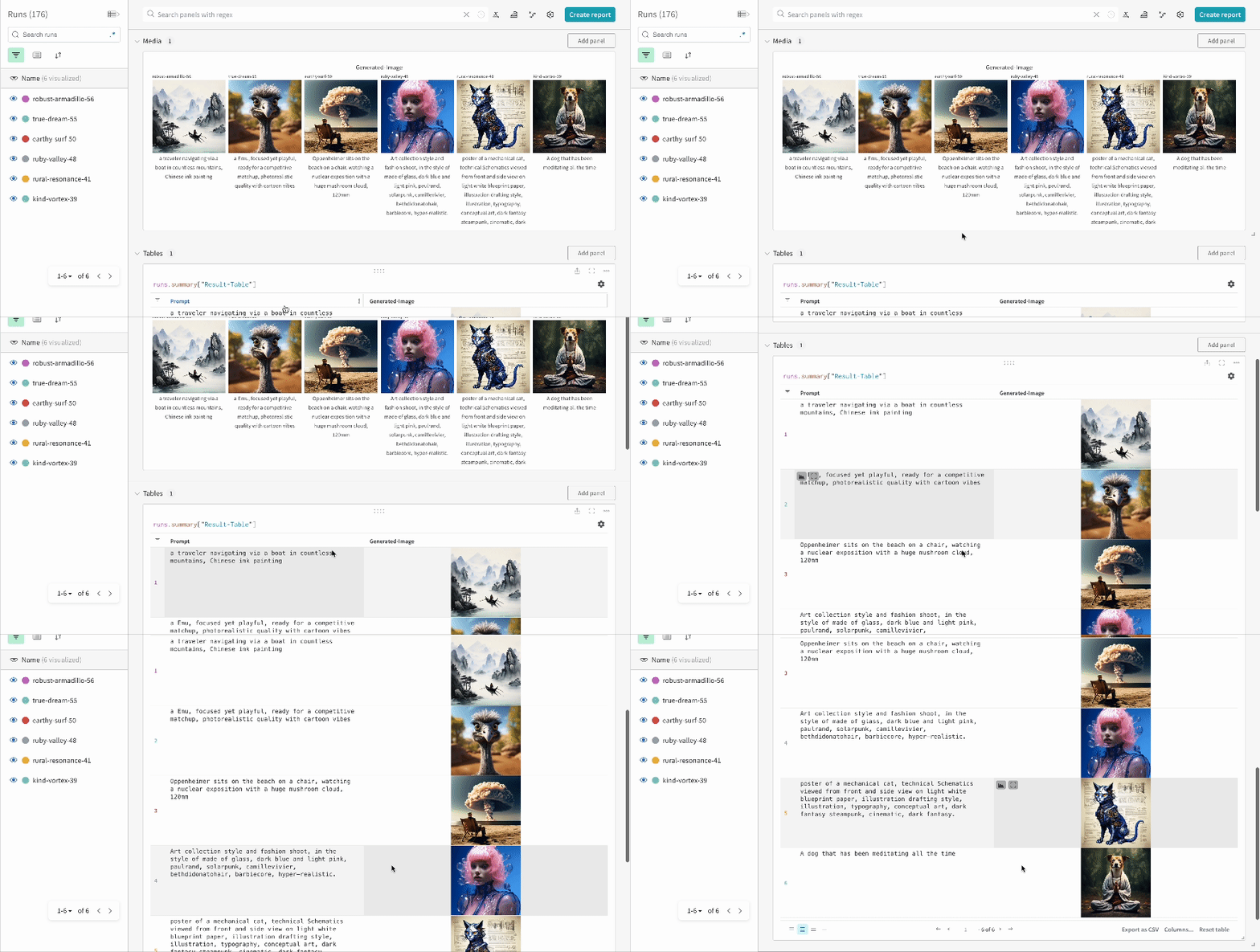
* 各パイプライン呼び出しは、Workspace 内のそれぞれ専用の[表](/ja/models/tables/)にトラッキングされ、その呼び出しに関連付けられた設定は、その run の設定内にあるワークフローのリストに追加されます。
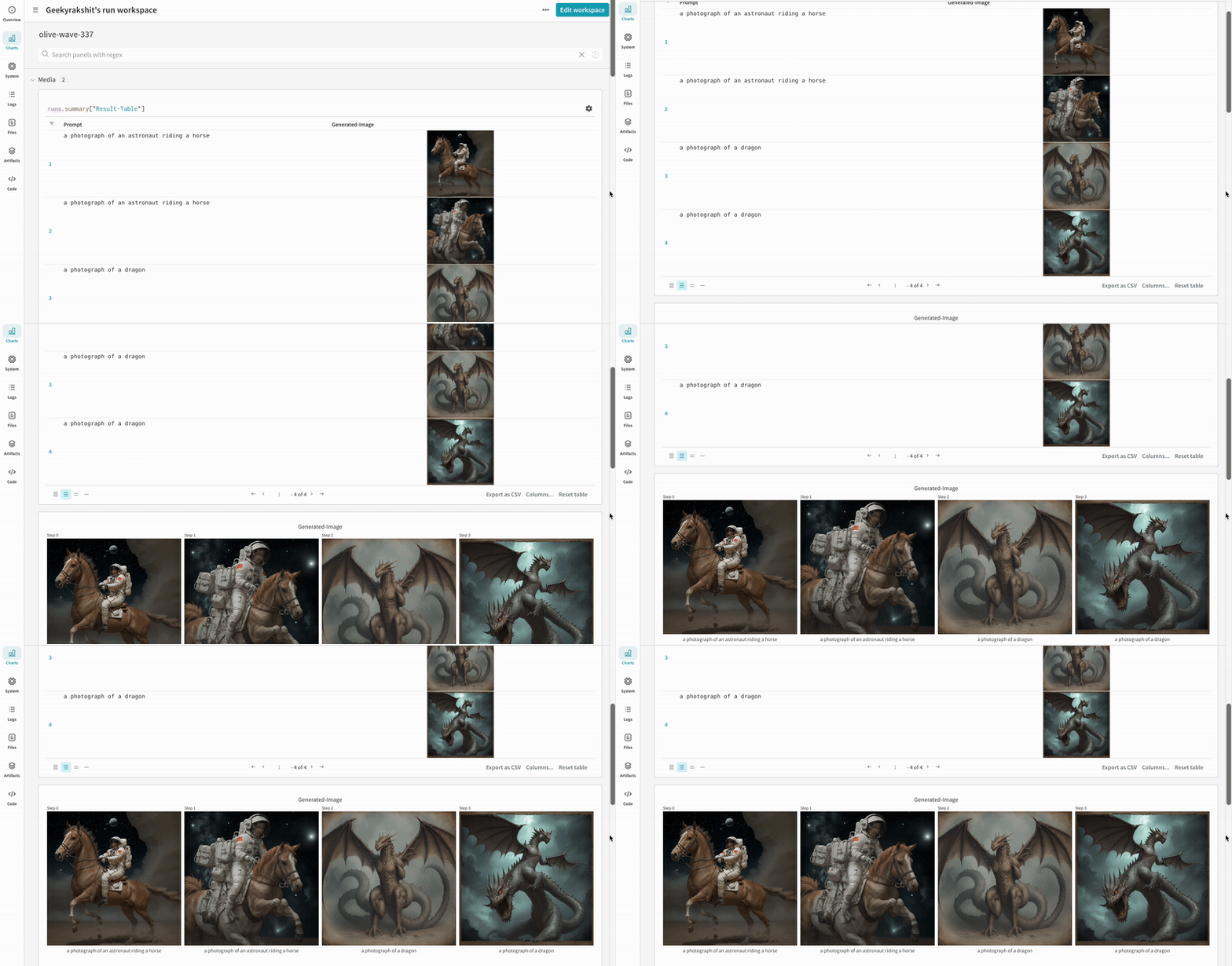
* プロンプト、ネガティブプロンプト、生成されたメディアは [`wandb.Table`](/ja/models/tables/) にログされます。
* seed やパイプラインアーキテクチャを含む、実験 に関連するその他すべての設定は、その run の config セクションに保存されます。
* 各パイプライン呼び出しで生成されたメディアも、run 内の[メディアパネル](/ja/models/track/log/media/)にログされます。
[サポートされているパイプライン呼び出しの一覧](https://github.com/wandb/wandb/blob/main/wandb/integration/diffusers/autologger.py#L12-L72)を確認できます。このインテグレーションの新機能をリクエストしたい場合や、関連する bug を報告したい場合は、[W\&B GitHub issues page](https://github.com/wandb/wandb/issues) で issue を作成してください。
## 例
### オートロギング
以下は、autolog が実際にどのように動作するかを示す、簡単なエンドツーエンドの例です。
```python theme={null}
import torch
from diffusers import DiffusionPipeline
# autolog 関数をインポートする
from wandb.integration.diffusers import autolog
# パイプラインを呼び出す前に autolog を呼び出す
autolog(init=dict(project="diffusers_logging"))
# Diffusion パイプラインを初期化する
pipeline = DiffusionPipeline.from_pretrained(
"stabilityai/stable-diffusion-2-1", torch_dtype=torch.float16
).to("cuda")
# プロンプト、ネガティブプロンプト、シードを定義する
prompt = ["a photograph of an astronaut riding a horse", "a photograph of a dragon"]
negative_prompt = ["ugly, deformed", "ugly, deformed"]
generator = torch.Generator(device="cpu").manual_seed(10)
# パイプラインを呼び出して画像を生成する
images = pipeline(
prompt,
negative_prompt=negative_prompt,
num_images_per_prompt=2,
generator=generator,
)
```
```python theme={null}
import torch
from diffusers import DiffusionPipeline
import wandb
# autolog 関数をインポートする
from wandb.integration.diffusers import autolog
run = wandb.init()
# パイプラインを呼び出す前に autolog を呼び出す
autolog(init=dict(project="diffusers_logging"))
# Diffusion パイプラインを初期化する
pipeline = DiffusionPipeline.from_pretrained(
"stabilityai/stable-diffusion-2-1", torch_dtype=torch.float16
).to("cuda")
# プロンプト、ネガティブプロンプト、シードを定義する
prompt = ["a photograph of an astronaut riding a horse", "a photograph of a dragon"]
negative_prompt = ["ugly, deformed", "ugly, deformed"]
generator = torch.Generator(device="cpu").manual_seed(10)
# パイプラインを呼び出して画像を生成する
images = pipeline(
prompt,
negative_prompt=negative_prompt,
num_images_per_prompt=2,
generator=generator,
)
# 実験を終了する
run.finish()
```
* 1 回の実験の結果:
IPython Notebook 環境でパイプラインの呼び出し後にコードを実行する場合は、[`wandb.Run.finish()`](/ja/models/ref/python/functions/finish) を明示的に呼び出す必要があります。Python スクリプトを実行する場合は不要です。
### 複数パイプラインのワークフローをトラッキングする
このセクションでは、典型的な [Stable Diffusion XL + Refiner](https://huggingface.co/docs/diffusers/using-diffusers/sdxl#base-to-refiner-model) ワークフローを例に、autolog を示します。このワークフローでは、[`StableDiffusionXLPipeline`](https://huggingface.co/docs/diffusers/api/pipelines/stable_diffusion/stable_diffusion_xl) によって生成された latent を、対応する Refiner でさらに精緻化します。
```python theme={null}
import torch
from diffusers import StableDiffusionXLImg2ImgPipeline, StableDiffusionXLPipeline
from wandb.integration.diffusers import autolog
# SDXLベースパイプラインを初期化する
base_pipeline = StableDiffusionXLPipeline.from_pretrained(
"stabilityai/stable-diffusion-xl-base-1.0",
torch_dtype=torch.float16,
variant="fp16",
use_safetensors=True,
)
base_pipeline.enable_model_cpu_offload()
# SDXLリファイナーパイプラインを初期化する
refiner_pipeline = StableDiffusionXLImg2ImgPipeline.from_pretrained(
"stabilityai/stable-diffusion-xl-refiner-1.0",
text_encoder_2=base_pipeline.text_encoder_2,
vae=base_pipeline.vae,
torch_dtype=torch.float16,
use_safetensors=True,
variant="fp16",
)
refiner_pipeline.enable_model_cpu_offload()
prompt = "a photo of an astronaut riding a horse on mars"
negative_prompt = "static, frame, painting, illustration, sd character, low quality, low resolution, greyscale, monochrome, nose, cropped, lowres, jpeg artifacts, deformed iris, deformed pupils, bad eyes, semi-realistic worst quality, bad lips, deformed mouth, deformed face, deformed fingers, deformed toes standing still, posing"
# ランダム性を制御して実験を再現可能にする。
# シードはWandBに自動的にログされる。
seed = 42
generator_base = torch.Generator(device="cuda").manual_seed(seed)
generator_refiner = torch.Generator(device="cuda").manual_seed(seed)
# DiffusersのWandB Autologを呼び出す。これにより、プロンプト、生成画像、
# パイプラインアーキテクチャ、および関連するすべての実験設定がW&Bに自動的にログされ、
# 画像生成実験の再現・共有・分析が容易になる。
autolog(init=dict(project="sdxl"))
# ベースパイプラインを呼び出して潜在変数を生成する
image = base_pipeline(
prompt=prompt,
negative_prompt=negative_prompt,
output_type="latent",
generator=generator_base,
).images[0]
# リファイナーパイプラインを呼び出して精緻化された画像を生成する
image = refiner_pipeline(
prompt=prompt,
negative_prompt=negative_prompt,
image=image[None, :],
generator=generator_refiner,
).images[0]
```
```python theme={null}
import torch
from diffusers import StableDiffusionXLImg2ImgPipeline, StableDiffusionXLPipeline
import wandb
from wandb.integration.diffusers import autolog
run = wandb.init()
# SDXLベースパイプラインを初期化する
base_pipeline = StableDiffusionXLPipeline.from_pretrained(
"stabilityai/stable-diffusion-xl-base-1.0",
torch_dtype=torch.float16,
variant="fp16",
use_safetensors=True,
)
base_pipeline.enable_model_cpu_offload()
# SDXLリファイナーパイプラインを初期化する
refiner_pipeline = StableDiffusionXLImg2ImgPipeline.from_pretrained(
"stabilityai/stable-diffusion-xl-refiner-1.0",
text_encoder_2=base_pipeline.text_encoder_2,
vae=base_pipeline.vae,
torch_dtype=torch.float16,
use_safetensors=True,
variant="fp16",
)
refiner_pipeline.enable_model_cpu_offload()
prompt = "a photo of an astronaut riding a horse on mars"
negative_prompt = "static, frame, painting, illustration, sd character, low quality, low resolution, greyscale, monochrome, nose, cropped, lowres, jpeg artifacts, deformed iris, deformed pupils, bad eyes, semi-realistic worst quality, bad lips, deformed mouth, deformed face, deformed fingers, deformed toes standing still, posing"
# ランダム性を制御して実験を再現可能にする。
# シードはWandBに自動的にログされる。
seed = 42
generator_base = torch.Generator(device="cuda").manual_seed(seed)
generator_refiner = torch.Generator(device="cuda").manual_seed(seed)
# DiffusersのWandB Autologを呼び出す。これにより、プロンプト、生成画像、
# パイプラインアーキテクチャ、および関連するすべての実験設定がW&Bに自動的にログされ、
# 画像生成実験の再現、共有、分析が容易になる。
autolog(init=dict(project="sdxl"))
# ベースパイプラインを呼び出して潜在変数を生成する
image = base_pipeline(
prompt=prompt,
negative_prompt=negative_prompt,
output_type="latent",
generator=generator_base,
).images[0]
# リファイナーパイプラインを呼び出して精製画像を生成する
image = refiner_pipeline(
prompt=prompt,
negative_prompt=negative_prompt,
image=image[None, :],
generator=generator_refiner,
).images[0]
# 実験を終了する
run.finish()
```
* Stable Diffusion XL + Refiner の実験例:
## 参考資料
* [Stable Diffusion向けプロンプトエンジニアリングガイド](https://wandb.ai/geekyrakshit/diffusers-prompt-engineering/reports/A-Guide-to-Prompt-Engineering-for-Stable-Diffusion--Vmlldzo1NzY4NzQ3)
* [PIXART-α: テキストから画像を生成するためのDiffusion Transformerモデル](https://wandb.ai/geekyrakshit/pixart-alpha/reports/PIXART-A-Diffusion-Transformer-Model-for-Text-to-Image-Generation--Vmlldzo2MTE1NzM3)
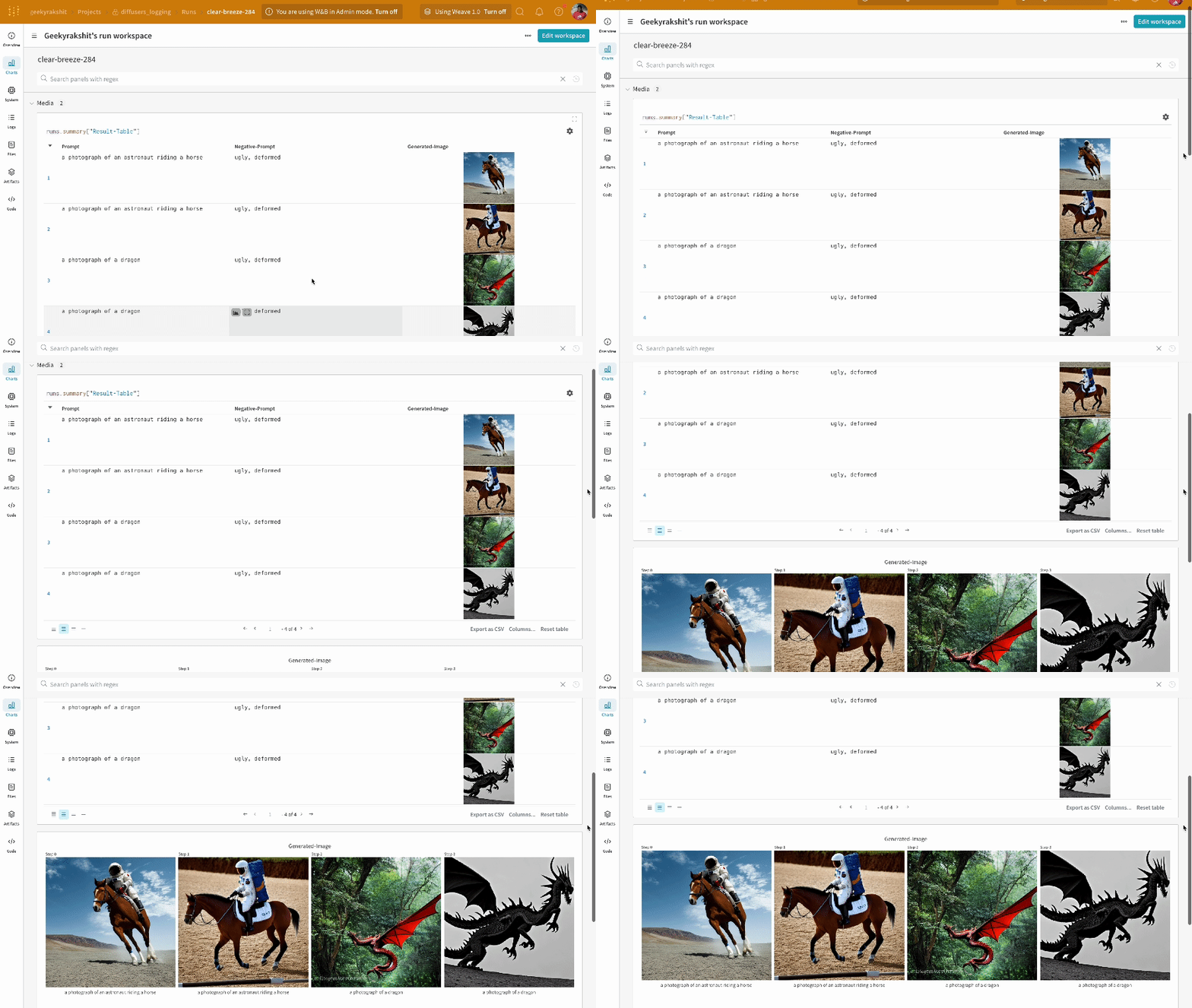 * 複数の実験の結果:
 * 実験の設定: