> ## Documentation Index
> Fetch the complete documentation index at: https://wb-21fd5541-docs-sandboxes-integrations-placement.mintlify.site/llms.txt
> Use this file to discover all available pages before exploring further.
> W&B Artifacts の概要、仕組み、使い始める方法。
# Artifacts の概要
export const TryProductLink = ({url}) =>
W&Bで試す
;
export const ColabLink = ({url}) =>
Colabで試す
;
W\&B Artifacts を使用すると、[W\&B Runs](/ja/models/runs) の入力と出力としてデータをトラッキングし、バージョン管理できます。たとえば、モデル トレーニングの run では、入力としてデータセットを受け取り、出力としてトレーニング済みのモデルを生成することがあります。ハイパーパラメーター、メタデータ、メトリクスは run にログできます。また、artifact を使用して、モデルのトレーニングに使用したデータセットを入力としてログ、トラッキング、バージョン管理し、別の artifact を使用して、生成されたモデル チェックポイントを出力としてログできます。
## 使用例
ML ワークフロー全体で、[runs](/ja/models/runs) の入力と出力として artifacts を使用できます。処理の入力には、データセット、モデル、さらには他の artifacts も使用できます。
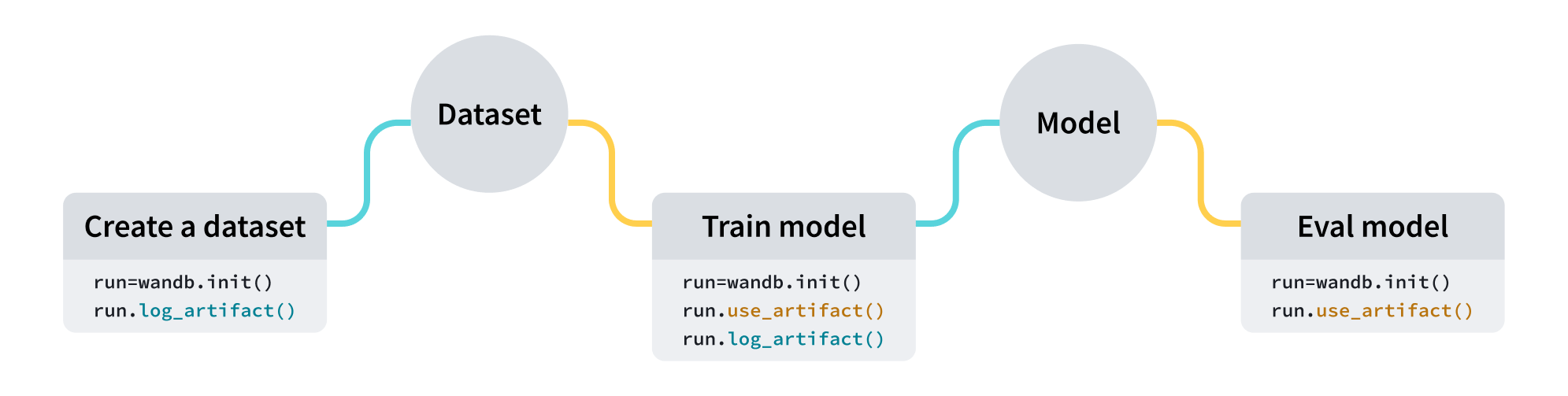 | 使用例 | 入力 | 出力 |
| ---------- | ------------------------- | ------------------------------- |
| モデル トレーニング | データセット (トレーニング データと検証データ) | トレーニング済みモデル |
| データセットの前処理 | データセット (生データ) | データセット (前処理済みデータ) |
| モデル評価 | モデル + データセット (テストデータ) | [W\&B Table](/ja/models/tables) |
| モデル最適化 | モデル | 最適化済みモデル |
以下のコード スニペットは、順番に実行することを前提としています。
| 使用例 | 入力 | 出力 |
| ---------- | ------------------------- | ------------------------------- |
| モデル トレーニング | データセット (トレーニング データと検証データ) | トレーニング済みモデル |
| データセットの前処理 | データセット (生データ) | データセット (前処理済みデータ) |
| モデル評価 | モデル + データセット (テストデータ) | [W\&B Table](/ja/models/tables) |
| モデル最適化 | モデル | 最適化済みモデル |
以下のコード スニペットは、順番に実行することを前提としています。
## artifact を作成する
4 行のコードで artifact を作成できます。
1. [W\&B run](/ja/models/runs) を作成します。
2. [`wandb.Artifact`](/ja/models/ref/python/experiments/artifact) を使って artifact オブジェクトを作成します。
3. `wandb.Artifact.add_file()` を使って、モデルファイルやデータセットなど、1 つ以上のファイルを artifact オブジェクトに追加します。
4. `wandb.Run.log_artifact()` を使って、artifact を W\&B にログします。
たとえば、次のコード例は、`dataset.h5` というファイルを `example_artifact` という名前の artifact にログする方法を示しています。
```python theme={null}
import wandb
with wandb.init(project="artifacts-example", job_type="add-dataset") as run:
artifact = wandb.Artifact(name="example_artifact", type="dataset")
artifact.add_file(local_path="./dataset.h5", name="training_dataset")
run.log_artifact(artifact)
```
* artifact の `type` は、W\&B プラットフォームでの表示に影響します。`type` を指定しない場合は、デフォルトで `unspecified` になります。
* ドロップダウンの各ラベルは、それぞれ異なる `type` パラメーター値を表します。上記のコードスニペットでは、artifact の `type` は `dataset` です。
外部のオブジェクトストレージ (Amazon S3 バケットなど) に保存されているファイルやディレクトリーへの参照を追加する方法については、[外部ファイルをトラッキングする](/ja/models/artifacts/track-external-files) ページを参照してください。
## artifactをダウンロードする
run への入力としてマークする artifact は、[`wandb.Run.use_artifact()`](/ja/models/ref/python/experiments/run#use_artifact) method で指定します。
前のコードスニペットに続き、以下のコード例では、先ほど作成した `example_artifact` という artifact の使い方を示します:
```python theme={null}
with wandb.init(project="artifacts-example", job_type="add-dataset") as run:
artifact = run.use_artifact("training_dataset:latest") # "my_data" artifactを使用してrunオブジェクトを返す
```
これにより、artifactオブジェクトが返されます。
次に、返されたオブジェクトを使用して、artifactのすべての内容をダウンロードします。
```python theme={null}
datadir = artifact.download() # `my_data` artifact全体をデフォルトディレクトリにダウンロードします。
```
特定のディレクトリーに artifact をダウンロードするには、`root` [パラメーター](/ja/models/ref/python/experiments/artifact) にカスタムパスを指定できます。Artifacts をダウンロードする別の方法や追加のパラメーターについては、[Artifacts のダウンロードと使用](/ja/models/artifacts/download-and-use-an-artifact) ガイドを参照してください。
## 次のステップ
* Artifacts の [version](/ja/models/artifacts/create-a-new-artifact-version) の作成と [update](/ja/models/artifacts/update-an-artifact) の方法を学びます。
* [automations](/ja/models/automations) を使用して、Artifacts の変更をきっかけにダウンストリームのワークフローをトリガーしたり、Slack チャンネルに通知したりする方法を学びます。
* トレーニング済みモデルを保存するためのスペースである [registry](/ja/models/registry) について学びます。
* [Python SDK](/ja/models/ref/python/experiments/artifact) と [CLI](/ja/models/ref/cli/wandb-artifact) のリファレンスガイドを確認します。